
Episode 8: Many agents at once
Run several command-line AI agents at once, safely: open more terminals (tabs and split panes in Windows Terminal, one task each), or ask one agent to fan out helpers in plain words. The one rule: two agents never edit the same file.
Downloads
AI for Research Efficiency, episode 8, with Douglas Hutchings. Narration: an AI-generated voice (ElevenLabs).
Two ways to get more done with an agent, and the one rule that keeps it safe. Keys and words as of 4 October 2026, from Microsoft's, Apple's, Anthropic's, OpenAI's and Google's documentation (sources below), and from sessions recorded that day in Claude Code 2.1.289 and Codex 0.160.0. The tools change often: if a key or a word does nothing, check the tool's own help (/help).
What the film shows
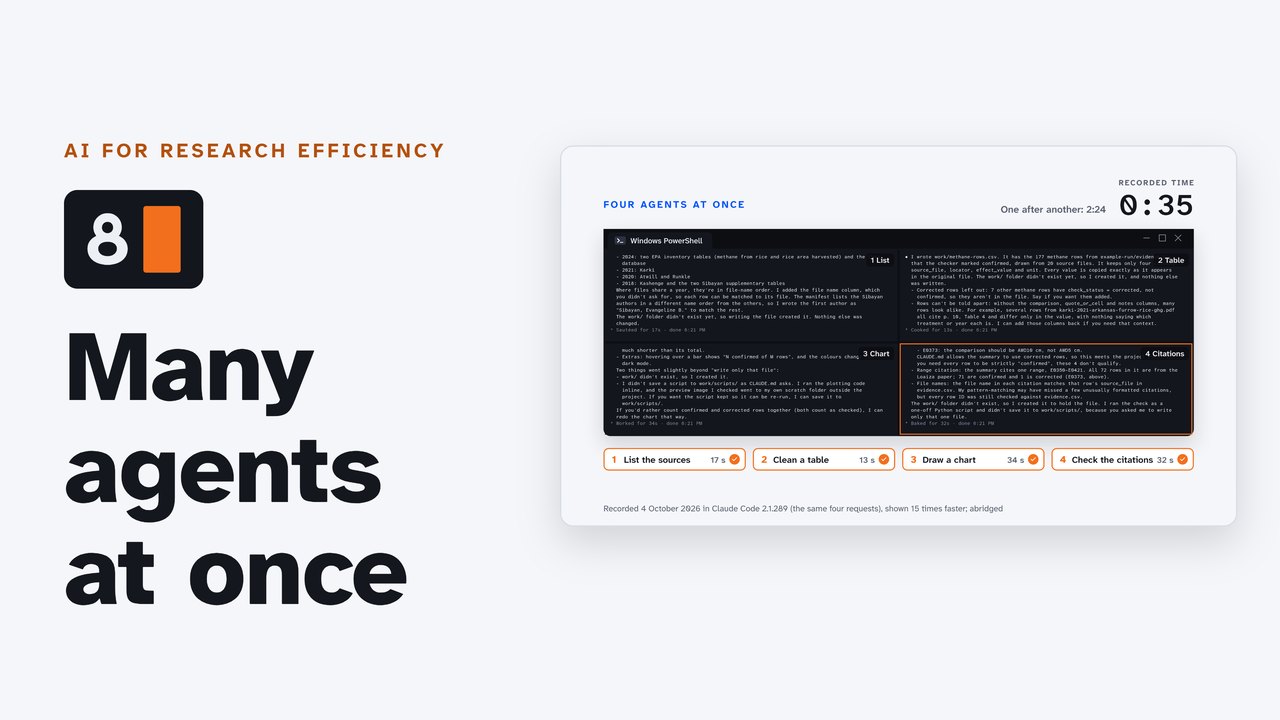
The same four small jobs, in a copy of the practice folder from episode 3: list the sources by year, keep the confirmed methane rows in a table, chart the confirmed rows per source, and check the summary's citations. One Claude Code session doing them one after another took 2 minutes 24 seconds from the first request to the last answer; four sessions side by side, one job each, took 35 seconds, the time of the longest. Each wrote only its own file in work/.
1. Two ways to scale
- More terminals: open a tab or a pane for each task, go to your project folder, and start one agent in each, with its own task and its own output file.
- One agent, many helpers: ask one agent to split the work and run helpers (subagents) in parallel. In episode 3, one lead agent ran 17: eight readers at once, then eight checkers, then a writer.
2. Tabs and panes
| Windows Terminal | Mac Terminal | |
|---|---|---|
| A new tab | Ctrl+Shift+T | Command+T |
| Split: one more pane | Alt+Shift+D (a duplicate of the focused pane) | Command+D splits the window, but Apple does not say what the second pane shows (not confirmed: use tabs or two windows side by side) |
| Split to the right, or below | Alt+Shift+= (the plus key), Alt+Shift+- | |
| Move between panes | Alt and the arrow keys | Control+Tab between tabs |
| Resize a pane | Alt+Shift and the arrow keys | |
| Close a pane | Ctrl+Shift+W (the last pane closes the tab) | Command+W closes a tab |
A new tab or pane starts in your home folder (C:\Users\you), not the folder you were in. Go to your project folder again before you start the agent:
cd Documents\Or open Windows Terminal in the project folder from the start: right-click the folder, Open in Terminal (episode 4), or type wt -d . in a terminal that is already there.
3. The one rule
Two agents must never edit the same file. Let them read the same files, and give each one its own file to write: that is how the four agents in the film worked, and how episode 3's readers worked.
When agents must change the same files, every vendor's answer is a worktree: a second working copy of the project, on its own branch, made by Git. A worktree needs a Git repository (episode 5 makes one).
| Claude Code | Codex CLI | Antigravity CLI | |
|---|---|---|---|
| Start in a new worktree | claude -w review-a (or --worktree review-a) | codex --worktree | no command-line flag; its subagents can each get their own worktree, and the desktop app gives each session one |
| The vendor's advice | "Do the tasks touch the same files? Isolate the work with worktrees." | "Run chats concurrently, but avoid letting two chats change the same files." | Teamwork: "Multiple workers never edit the same file at the same time." |
4. Ask one agent to fan out
No special words are needed. Say how to split the work, whether to wait, and what to bring back (OpenAI's three elements of a request for helpers). This request works in all three tools (adapted from Anthropic's, OpenAI's and Google's examples):
Split this into independent parts and run one subagent per part in parallel. Each writes only its own file in work/In the film, asked to find each PDF's main finding with its page, Claude Code started three helpers, one per paper, and combined their findings when all three were back (1 minute 17 seconds). Codex, in a copy of the folder made a Git repository, did the same with its own helpers (1 minute 19 seconds).
5. Each tool's words
The same word can mean different things in different tools, so name the tool along with the word.
| Term | What it means | Tool | Nearest in the other two |
|---|---|---|---|
ultracode | a keyword in your request (or /effort ultracode): the agent writes and runs a workflow of many subagents | Claude Code | Codex: Ultra effort; Antigravity: /teamwork-preview, /boost |
ultrathink | a keyword: deeper reasoning on that one turn (not more agents) | Claude Code | Codex: Max effort; Antigravity: a higher --effort |
/code-review ultra | a fleet of reviewer agents in the cloud; 3 free runs on Pro and Max, then usage credits (paid) | Claude Code | Codex: /review (on your computer); Antigravity: none documented |
| Ultra | Codex's highest reasoning effort: "Ultra uses subagents to handle separate parts of a complex task in parallel." | Codex | Claude Code: ultracode; Antigravity: /boost |
| Ultrafast | a speed tier (Pro $500 and eligible Enterprise and Edu plans), not more agents | Codex | Claude Code: fast mode |
/teamwork-preview | an agent team: an orchestrator assigns files to workers | Antigravity | Claude Code: agent teams (experimental, off by default) |
/boost | multi-agent reasoning in temporary, separate worktrees | Antigravity | Claude Code: ultracode; Codex: Ultra |
| "fan out" | Anthropic's and Google's word for parallel helpers | Claude Code, Antigravity | OpenAI says spawn or delegate |
| Agents in the background | claude --bg "task", then claude agents | Claude Code | Codex: codex agents; Antigravity: /agents (the Agent Manager panel) |
| Cloud sessions | claude --cloud | Claude Code | Codex: codex cloud (experimental); Antigravity: none in the CLI |
6. How far it scales
- One allowance: every terminal and every helper draws on the same plan (episode 7). Many helpers use many times the tokens of one chat: Anthropic measured about 4 times for one agent and about 15 times for a multi-agent system (June 2025).
- Built-in ceilings: Claude Code runs up to 20 subagents at once by default (a 21st fails with "Concurrent subagent limit reached"), and a workflow up to 16 agents at once and 1,000 in a run. Codex has a setting for it (
agents.max_concurrent_threads_per_session). - Files: two agents, one file: one overwrites the other (the one rule).
- Your time: every result still needs checking. Run only as many as you can check.
Not confirmed yet (left out of the film until tested on a Windows PC and a Mac): what the second pane of Mac Terminal's Command+D shows; how many panes Windows Terminal allows (none is documented); Antigravity's screens (it was not signed in when the episode was recorded: its words come from its documentation).
Try it
- Split the window: Alt+Shift+D.
- Start your agent in each pane, in your project folder.
- Give each one its own task, each writing its own file.
You should see two new files, one from each agent.
Sources
Read on 4 October 2026 (copies kept with the project). The agents' screens in the film come from sessions recorded that day in Claude Code 2.1.289 and Codex 0.160.0, in copies of the practice folder outside the studio's repository (one copy for the four side by side, one for the sequence, one for each fan-out; the Codex copy made a local Git repository).
- Microsoft: Panes in Windows Terminal (opens in a new tab); Custom actions and keybindings in Windows Terminal (opens in a new tab); Command line arguments for Windows Terminal (opens in a new tab); Install and get started setting up Windows Terminal (opens in a new tab); Tutorial: Opening a tab or pane in the same directory in Windows Terminal (opens in a new tab); microsoft/terminal defaults.json at v1.25.2733.0 (the default key bindings) (opens in a new tab); microsoft/terminal userDefaults.json at v1.25.2733.0 (a new settings.json) (opens in a new tab).
- Apple: Keyboard shortcuts in Terminal on Mac (opens in a new tab).
- Anthropic (Claude Code): Claude Code docs: Run agents in parallel (opens in a new tab); Claude Code docs: Create custom subagents (opens in a new tab); Claude Code docs: Dynamic workflows (opens in a new tab); Claude Code docs: Worktrees (opens in a new tab); Claude Code docs: Agent teams (opens in a new tab); Claude Code docs: Ultrareview (opens in a new tab); Claude Code docs: Model configuration (opens in a new tab); Claude Code docs: Manage costs effectively (opens in a new tab); Claude Code docs: Error reference (opens in a new tab); Claude Code docs: Best practices (opens in a new tab); Claude Code docs: Use Claude Code in the cloud (opens in a new tab); How we built our multi-agent research system (13 June 2025) (opens in a new tab).
- OpenAI (Codex): Codex docs: Subagents (opens in a new tab); Codex docs: Models (opens in a new tab); Codex docs: Speed (opens in a new tab); Codex docs: Git worktrees (opens in a new tab); Codex docs: Long-running work (opens in a new tab); Codex docs: Best practices (opens in a new tab); Codex docs: Codex Cloud (opens in a new tab).
- Google (Antigravity): Antigravity docs: Custom subagents (opens in a new tab); Antigravity docs: Teamwork (opens in a new tab); Antigravity docs: Boost (opens in a new tab); Antigravity docs: CLI best practices (opens in a new tab); Antigravity docs: CLI reference (opens in a new tab); Antigravity docs: CLI features (opens in a new tab); Antigravity docs: Projects (Antigravity 2.0) (opens in a new tab).
Corrections
None so far. If you find something wrong, email doug,@douglashutchings.com.
Transcript
Every spoken line, by chapter
Four jobs, two ways
One agent, four small jobs, one after another: a list, a table, a chart and a check. 2 minutes 24 seconds.
Four agents, the same four jobs, at the same time: 35 seconds.
AI for Research Efficiency. Episode 8: Many agents at once.
Last time: tokens, and the one allowance every agent draws on.
In this episode: run several agents at once, safely, and ask for parallel work in words every tool understands.
1. Two ways to scale
One: two ways to scale.
Open more terminals, and start one agent in each, with its own task.
Or ask one agent to split the work and run helpers in parallel. In episode 3, one agent ran 17 of them: 8 readers at once, then 8 checkers, then a writer.
2. Tabs and panes
Two: tabs and panes.
In Windows Terminal, Ctrl+Shift+T opens a new tab, and Alt+Shift+D splits the window into a second pane.
Alt and the arrow keys move between panes; with Shift, the arrows resize them. Ctrl+Shift+W closes one.
A new tab or pane starts in your home folder, not the one you were in. So go to your project folder again, then start the agent.
On a Mac, Command+T opens a new tab; or put two Terminal windows side by side.
3. The one rule
Three: the one rule.
Two agents must never edit the same file. Let them read the same files, and give each one its own file to write.
That's how these four worked: one folder, four agents, four new files, and nothing overwritten.
If they must change the same files, every vendor's answer is a worktree: a second working copy of the project, on its own branch.
Claude Code starts one with -w, Codex with --worktree, and Antigravity can give its helpers their own. Each needs a repository, like the one from episode 5.
4. Ask one agent to fan out
Four: ask one agent to fan out.
No special words are needed. Say how to split the work, whether to wait, and what to bring back.
For example: split this into independent parts, and run one subagent per part in parallel. Each writes only its own file. Wait for all of them, then combine the results, and list anything that failed.
Claude Code started three helpers, one per paper, and combined their findings when all three were back. Codex and Antigravity did the same with their own.
5. Each tool's words
Five: each tool's own words, because the same word can mean different things.
In Claude Code, ultracode starts a workflow of many subagents, while ultrathink only means deeper reasoning, on one turn.
In Codex, Ultra is the highest reasoning effort, and it splits the work across subagents.
Antigravity calls its versions teamwork and boost.
So name the tool along with the word. The full list, with each term's nearest match, is on the companion page.
6. How far it scales
Six: how far it scales.
Every agent draws on the same allowance, from episode 7.
And there are built-in ceilings: Claude Code runs up to 20 subagents at once.
And every result still needs checking. Run only as many as you can check.
Try it
Pause here, and try it: two panes, two tasks, each writing its own file.
Review and next
So: split the work, give each agent its own file, and check what comes back.
Next: your data, your keys, your campus.