
Episode 12: Make a narrated explainer of your paper
One real run: an AI agent turns an openly licensed paper into a short narrated, captioned explainer video, every sentence pinned to the page it came from, and checks its own work. You make the paid voice yourself, outside the agent's session, so your key never reaches it.
Downloads
AI for Research Efficiency, episode 12, with Douglas Hutchings. Narration: an AI-generated voice (ElevenLabs).
One real run, replayed: an agent turns one openly licensed paper into a short narrated, captioned video, every sentence pinned to the page it came from. The paid voice is made by you, outside the agent's session, so your key never reaches the agent. Recorded on 4 October 2026 with Claude Code 2.1.289 (auto mode), in a folder of its own; the terms below were read the same day. Any command-line agent can follow the same instruction file.
1. The folder
explainer/ paper/The paper in the run: Minamikawa, K. (2025), Climate-smart water management in rice paddies: a meta-synthesis on greenhouse gas emissions and yield impacts, Paddy and Water Environment 23:525-532, doi.org/10.1007/s10333-025-01045-4 (opens in a new tab), licensed CC BY 4.0 (opens in a new tab): anyone may share and adapt it, with credit. It is the review behind episodes 3 and 4.
2. The instruction file (a starter)
Copy it into your folder as CLAUDE.md (or AGENTS.md), and change the voice's name to one you choose.
# A narrated explainer of one paper The goal: a one-minute video that explains one paper to people outside its field: slides,3. The prompt
Make a one-minute narrated explainer of the paper in paper/4. The voice: you make the paid request
The agent writes voice/request.json and waits. You make the request yourself, in your own terminal, with voice.py below (Python's standard library only). It shows the request's length and asks before it sends anything; it writes narration.mp3 and alignment.json (each character's start and end, in seconds) next to the request.
- Your key comes from
ELEVENLABS_API_KEY, or from a.envfile in the folder you runvoice.pyfrom. Keep that folder outside the agent's project folder, never paste the key into a chat, and never commit it (episode 9). - The voice: a stock voice from ElevenLabs' library, by its ID (add yours to
VOICES). Never clone someone's voice without their consent. - The cost: in the run, 966 characters cost 106 credits on the studio's plan (about 0.11 credits a character on 4 October 2026, ElevenLabs' launch price for its v4 model, which ran until 12 October 2026; after it, expect roughly three to four times as many credits a character, and your plan's rate may differ). Check your balance before you send.
python voice.py path\"""voice.py: make an explainer's narration from the agent's request,5. Slides, captions and the video
The agent in the run wrote two small Python scripts: one draws the slides (Pillow), one turns the timings into captions and calls ffmpeg. You need both tools:
| Windows | Mac | |
|---|---|---|
| Pillow (drawing the slides) | python -m pip install --upgrade Pillow | python3 -m pip install --upgrade Pillow |
| ffmpeg (the video) | winget install --id Gyan.FFmpeg, then open a new terminal | brew install ffmpeg (with Homebrew), or a static build linked from ffmpeg.org |
The run's ffmpeg call, from work/build_video.py: the slides as a list with durations (slides.ffconcat), the narration, and the captions burned in.
ffmpeg -y -f concat -safe 0 -i work/6. What you check before you share
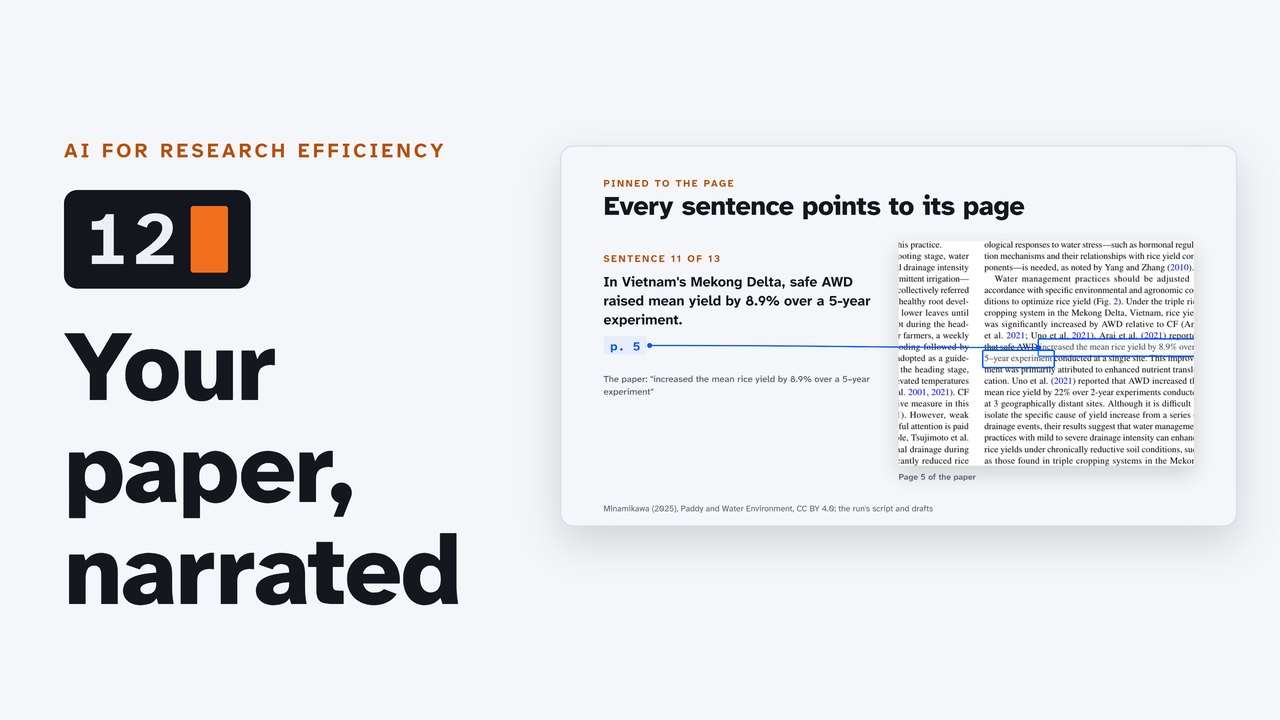
- Each sentence against its page. In the run, every number was right, but cutting the script for length took out a qualifier: the 8.9% yield gain came from "a 5-year experiment conducted at a single site" (page 5). The first draft said "at one site"; the final one did not.
- The voice against the numbers. The agent cannot listen; you can. Every number should sound the way the paper prints it.
- The credit to the paper (its license), on the video and wherever you post it.
- The disclosure: a line on the video saying the voice is AI-generated.
7. The voice service's terms (ElevenLabs, read 4 October 2026)
| Free plan | "does not include a commercial license"; content published from it must carry "elevenlabs.io" or "11.ai" in its title |
| Paid plans | "All paid plans include a commercial license, provided you're not using Beta Services." |
| After a subscription | "you will still have a commercial license to use whatever you generated during that subscription forever" |
| Other people's voices | never replicated "without consent or legal right" |
| Disclosure | never in a way "intended to deceive others about whether the voice was generated by artificial intelligence" |
This series is narrated with ElevenLabs, on a paid plan we use and value (paid). A free alternative that runs on your own computer: Kokoro (opens in a new tab), an open-weight voice model under the Apache 2.0 license. YouTube asks creators to disclose realistic AI-generated content when they upload ("AI use" in YouTube Studio).
The run, in numbers
| Start to finish | 5 minutes 7 seconds (headless, auto mode; one session) |
| The script | 215 words in its first draft; 159 words in 13 sentences, each with its page |
| The voice | 966 characters; estimated at 107 credits, cost 106; back about 20 seconds after the request appeared |
| The slides | 12, drawn with Pillow; four fixed after the agent looked at them |
| The captions | 17, at most two lines of 42 characters |
| The video | 88.6 seconds (the target was one minute; this voice reads at about 108 words a minute) |
Not confirmed yet
Tested on the studio's Linux server, not yet on a Windows PC or a Mac: the winget package's ffmpeg on the PATH after a new terminal; ffmpeg's subtitles filter finding a font on Windows; the Pillow fonts the agent chose (DejaVu Sans is not on Windows by default: the agent would pick another).
Sources
- The paper: Minamikawa (2025) (opens in a new tab), CC BY 4.0 (the license (opens in a new tab)).
- ElevenLabs: Can I publish the content I generate? (opens in a new tab); What happens to my content after my subscription ends? (opens in a new tab); Terms of Service (opens in a new tab); Prohibited Use Policy (opens in a new tab); Pricing (opens in a new tab); API keys (opens in a new tab); Create speech with timing (opens in a new tab); Models (opens in a new tab). Read 4 October 2026.
- Tools: FFmpeg downloads (opens in a new tab); Gyan.FFmpeg on winget (opens in a new tab); ffmpeg on Homebrew (opens in a new tab); burning subtitles (opens in a new tab); Pillow installation (opens in a new tab); Kokoro (opens in a new tab).
- YouTube: Disclosing use of altered or synthetic content (opens in a new tab).
Corrections
None so far. If you find something wrong, email doug,@douglashutchings.com.
Transcript
Every spoken line, by chapter
From a paper to a video
This is a 2025 review by Kazunori Minamikawa in Paddy and Water Environment. Flooded rice fields release methane, a greenhouse gas made by soil microbes.
An agent made this explainer from one paper, in about five minutes: the script, the slides, the captions, and the video.
Every sentence points to the page it came from. And the paid voice? The agent never saw the key.
AI for Research Efficiency. Episode 12: Make a narrated explainer of your paper.
Last time, you mapped a research field with OpenAlex.
This time, one paper becomes a short narrated video, for a lab's page, a class, or a grant's broader impacts. One real run, replayed.
1. The folder and its rules
The folder: the paper, an instruction file, and three empty folders, for the work, the voice, and the finished video.
The paper is a 2025 review of water management in rice, licensed CC BY: anyone may adapt it, with credit. It's the review behind episodes 3 and 4.
The instruction file sets the rules. About 150 words, one sentence per line, each ending with its page. Only what the paper says, and every number as printed.
And one rule for the voice: the agent has no key, and must not look for one. It writes a request, and waits for the audio.
2. A script, page by page
The prompt asks for the script first, checked against the paper; then the voice request, the slides, and the video.
In its first 10 seconds, the agent splits the paper into one text file per page, so each sentence can carry its page.
35 seconds in, a first draft: 215 words, too long for a minute. It cuts.
Two more drafts. Then it checks each figure against the page it cites, and writes down every check.
At 82 seconds: 159 words in 13 sentences, each with its page.
3. Every sentence, pinned to its page
Methane fell by 31 to 62%: page 1, in the abstract.
Both gases together, 33.6 to 56.2% lower: page 3.
Safe AWD raised yield by 8.9%, over a 5-year experiment: page 5.
Page 5 says one thing more: the experiment was at a single site. The first draft said so; cutting for length took it out.
The numbers are right, but the context is thinner. That's the check only you can make: does each sentence still mean what the paper means?
4. The voice, and the key
Now the voice. The agent writes a request: the text, a stock voice, and the model. Then it waits.
You make the paid request yourself, outside the agent's session, with the key from your own .env file. The companion page has a short script for it.
First an estimate: 966 characters, about 107 credits.
About 20 seconds later, the audio is back, with the start and end of every character. It cost 106 credits.
The agent never saw the key. It saw two files appear.
5. Slides, captions, video
Meanwhile, the agent drew 12 slides in Python: one idea each, the key number large.
It looked at them all at once, and fixed what it saw: a clipped number, a drawing over a title, and text running off two slides.
The character timings become captions: a sentence at a time, at most two lines.
Then ffmpeg puts it together: each slide while its sentences are spoken, the voice, and the captions burned in.
It checks the result: the length matches the voice, every slide appears, and the captions can be read. It made their boxes darker until they could.
5 minutes and 7 seconds, start to finish.
6. What you check
Its report is candid: the video runs 89 seconds, not 60. This voice reads slowly, and the paper's address alone takes 12 seconds.
And it names what it could not check: it cannot listen. So listen yourself; every number should sound the way the paper prints it.
Before you share it: each sentence against its page, the voice against the numbers, the credit to the paper, and a line that says the voice is AI.
7. The voice service's terms
About the voice service. ElevenLabs' free plan can't be used commercially, and anything you publish from it must have elevenlabs.io in its title.
Paid plans include a commercial license, and what you make during a subscription stays licensed after it ends.
Never clone someone's voice without their consent, and never hide that a voice is AI.
This series is narrated with ElevenLabs, on a paid plan we use and value. A free voice that runs on your own computer is on the companion page.
The explainer, in full
Here is what the run made, in full.
This is a 2025 review by Kazunori Minamikawa in Paddy and Water Environment. Flooded rice fields release methane, a greenhouse gas made by soil microbes. Draining fields now and then, as in alternate wetting and drying, or A W D, cuts it. The review gathers 11 meta-analyses, studies that pool many experiments. Compared with continuous flooding, methane fell by 31 to 62%. But nitrous oxide, another greenhouse gas, rose by 37 to 445%. Counting both gases, their combined climate impact fell by 33.6 to 56.2%. Rice yield ranged from a 5.4% loss to an 11% gain. Yields generally held if water fell no more than 15 cm below the soil surface. With this milder approach, called safe A W D, significant yield losses are unlikely. In Vietnam's Mekong Delta, safe A W D raised mean yield by 8.9% over a 5-year experiment. Tuned to the crop and place, water management can save water, cut emissions, and keep or raise yields. Read the paper at doi dot org slash ten point one zero zero seven slash s one zero three three three dash zero two five dash zero one zero four five dash four.
Try it
Try it with your own paper: copy the instruction file from the companion page, ask for the script first, and check every sentence against its page before you make the voice.
Review and next
So: pin every sentence to its page, keep the key with you, listen before you share, and say the voice is AI.
Next: how this series is made.