
Episode 5: Save and share your work with GitHub
Keep every version of a research project and share it with a co-author: Git keeps the folder's history on your computer, and GitHub keeps a private copy online. A command-line agent runs every command, and you approve each one.
Downloads
AI for Research Efficiency, episode 5, with Douglas Hutchings. Narration: an AI-generated voice (ElevenLabs).
Keep every version of a research project with Git, and share it privately on GitHub, with your command-line agent running the commands and you approving each one. Windows first, with the Mac beside it. Commands and labels as of 4 October 2026, from GitHub's documentation, the GitHub CLI's manual and gh 2.102.0 itself, and Git's own book (sources below); the agents' screens are from sessions recorded that day in Claude Code 2.1.289 and Codex 0.160.0 on copies of the practice folder. GitHub changes its pages often: if a label differs, follow GitHub's own documentation.
1. Git, and GitHub
Git keeps a folder's history on your own computer: each saved version is a commit, with a message that says what changed. GitHub keeps a copy online that you choose to share. On the free plan you can have unlimited private repositories (with a limited feature set). For research, start private: making a repository public later is a decision, not a default, and then "the code will be visible to everyone who can visit GitHub.com".
2. Set up once
Make a free account at github.com. GitHub asks every account that contributes code to turn on two-factor authentication.
Install GitHub's command-line tool,
gh(Git itself came with episode 2.0):Windows
Windows (PowerShell):
winget install --id GitHub.cli --source wingetThen open a new window: in Windows Terminal a new tab is not enough, because the installer changes your PATH.
Mac
Mac (Terminal, with Homebrew):
brew install ghSign in:
gh auth loginIt asks: where you use GitHub (GitHub.com), the protocol for Git (HTTPS), whether to authenticate Git with your GitHub credentials (Yes), and how to sign in (Login with a web browser). Then it shows a one-time code (eight characters with a hyphen); press Enter, and paste the code in the browser page it opens (
https://github.com/login/device).
3. Make the folder a repository
Start your agent in your project folder, in the mode that asks before each step, and ask in plain words. The request from the film, word for word:
Make this folder a Git repository. Keep large files and anything with a key out of it,| Claude Code | Codex CLI | Antigravity CLI | |
|---|---|---|---|
| The mode that asks first | manual mode (Shift+Tab to switch) | /permissions, Ask for approval | its default mode |
The agent writes a .gitignore: the list of what Git leaves out. The one the recorded agent wrote began like this:
# Keys: never commit (copy .env.example to .env and fill it in locally).env.env.*!.env.example # Large raw data (data/A name and an email for the commits. If Git doesn't know who you are yet, the first commit stops: an agent asks you for them, and Git on its own says *** Please tell me who you are. Set them once for every repository on your computer (the agent can run these when you ask):
git config --global user.name "Your Name"git config --global user.email "ID+USERNAME@users.noreply.github.com"The email is published with every commit you push. To keep yours private, use the noreply address GitHub gives you: GitHub's Settings, Emails, "Keep my email address private" shows it (accounts made after 18 July 2017 have the form ID+USERNAME@users.noreply.github.com).
4. Read the list before anything goes up
Ask for the list of files before the first commit and before any push, and read it. In the film the list was 22 files (about 4 MB): the key file (.env) and a 140 MB sensor log (data/) were kept out.
- On the free plan, GitHub does not scan private repositories for keys. Secret scanning "runs automatically for free" on public repositories; push protection "stops you from pushing secrets to public repositories". Nothing at GitHub stops a key you commit to a private repository, so keep keys in
.envand.envin.gitignore. - If a key does get committed, revoke it first (make a new one): GitHub's own advice. Rewriting the history afterwards does not reach copies others already have.
- GitHub's advice for doing it yourself: avoid the catch-all
git add .; add files by name, and review what you staged withgit diff --cached. - Large files: Git warns above 50 MiB, and GitHub blocks files larger than 100 MiB. Share large data another way.
- Your campus's rules come first. Unpublished research data may need approval before it goes to any online service. At the University of Arkansas, "Research data prior to publication" is Highly Sensitive (FPP 921.0); the university also runs its own GitLab for UARK users, and recommends github.com or gitlab.com for projects that must be open to people outside the university.
5. Create the repository, and push
Ask the agent to create a private repository on GitHub and push to it. It runs:
gh repo create awd-review-practice --private --source . --push--source . uses this folder (the repository takes the folder's name unless you give one), --private keeps it private, and --push sends your commits. gh then prints, for example:
✓ Created repository your-username/6. Invite a co-author
On the repository's page: Settings, then Collaborators (under Access), Add people, type their GitHub username, pick them, and Add NAME to REPOSITORY. They get an email invitation; once they accept, they can work in the repository with you.
On a personal account, every collaborator can read and push (change the files). Read-only access needs an organization, where repositories have roles such as Read. Researchers can apply for GitHub Education, which offers a free GitHub Team organization to verified teachers and researchers.
7. Make it a habit
Three requests, in plain words, work in any of the three tools:
- After each change: "Commit this, with a message that says what changed."
- To see: "What changed since Monday?"
- To undo: "Put it back as it was." (Git keeps the undo as a new commit, so nothing is lost.)
Cite it, license it, archive it
- A license tells others what they may do with your code: without one, "the default copyright laws apply". choosealicense.com explains the common ones (MIT is short; Creative Commons licenses are for data and media, not code).
- A citation file: a
CITATION.cffat the top of the repository adds "Cite this repository" to its page. - A DOI for your code: Zenodo archives a GitHub repository and gives each release a DOI, but it "can only access public repositories", and it needs a license and a release. Zenodo has been slower than usual this autumn (its post of 15 September 2026).
Other ways in
- GitHub Desktop does the same with windows and buttons (Windows 10 64-bit or later, macOS 12 or later).
- GitHub Education: "Be an educator, faculty member, or researcher" with a school email; verified teachers get GitHub Copilot Pro and can apply for a free GitHub Team organization.
Not confirmed yet
Left out of the film until they are tested on a Windows PC and a Mac: whether winget install --id GitHub.cli asks for an administrator on a standard account; whether Git on a new Windows PC stops for a name and email or guesses an address from the computer's name.
Sources
Read on 4 October 2026 (copies kept with the project). The agents' screens come from sessions recorded that day on copies of the practice folder: Claude Code 2.1.289 in manual mode (a sample key file and a 140 MB sample sensor log added to the folder), and Codex 0.160.0 on an example history made for the film. Signing in, creating the repository and the invitation were not run in anyone's account: gh's lines come from gh 2.102.0's own text, GitHub's pages are redrawn from its documentation, and the account is a placeholder.
- GitHub Docs: GitHub CLI manual: gh auth login (opens in a new tab); GitHub CLI manual: gh repo create (opens in a new tab); Adding locally hosted code to GitHub (opens in a new tab); Permission levels for a personal account repository (opens in a new tab); Inviting collaborators to a personal repository (opens in a new tab); Repository roles for an organization (opens in a new tab); Secret scanning (opens in a new tab); Push protection (opens in a new tab); Removing sensitive data from a repository (opens in a new tab); Storing your secrets safely (opens in a new tab); Ignoring files (opens in a new tab); Setting your commit email address (opens in a new tab); Setting repository visibility (opens in a new tab); GitHub's plans (opens in a new tab); About large files on GitHub (opens in a new tab); About mandatory two-factor authentication (opens in a new tab); About GitHub Education for teachers (opens in a new tab); Apply to GitHub Education as a teacher (opens in a new tab); About CITATION files (opens in a new tab); Referencing and citing content (opens in a new tab); Licensing a repository (opens in a new tab); Installing GitHub Desktop (opens in a new tab); Caching your GitHub credentials in Git (opens in a new tab); GitHub CLI quickstart (opens in a new tab); GitHub Terms of Service (section G) (opens in a new tab); GitHub brand: Logo (opens in a new tab); Authorizing OAuth apps (the device flow) (opens in a new tab); Email addresses reference (opens in a new tab).
- The GitHub CLI: GitHub CLI: Installing gh on Windows (docs/install_windows.md) (opens in a new tab); GitHub CLI: Installing gh on macOS (docs/install_macos.md) (opens in a new tab); GitHub CLI v2.102.0 (the latest release, 2026-09-30; tarball checksum verified) (opens in a new tab); GitHub CLI v2.102.0 source: internal/authflow/flow.go, pkg/cmd/auth/shared/login_flow.go, pkg/cmd/repo/create/create.go (opens in a new tab).
- Git: Pro Git, 1.6 Getting Started: First-Time Git Setup (opens in a new tab); git-restore documentation (opens in a new tab); git-revert documentation (opens in a new tab).
- University of Arkansas: UA ITS: Code Repository and Issue Tracking (opens in a new tab); UA FPP 921.0 Data Classification (opens in a new tab).
- Others: Zenodo performance: an update on the current situation (2026-09-15) (opens in a new tab); Choose an open source license (opens in a new tab).
Corrections
None so far. If you find something wrong, email doug,@douglashutchings.com.
Transcript
Every spoken line, by chapter
Save every version
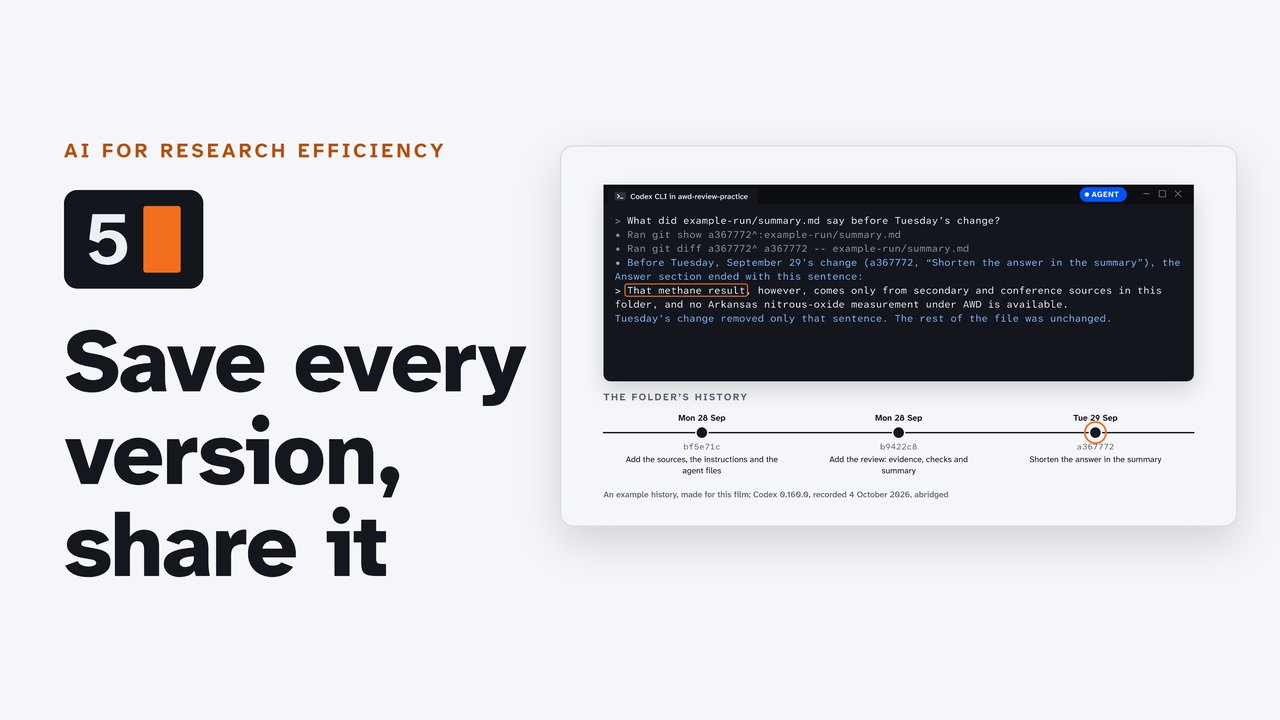
What did this summary say, before Tuesday's change?
Ask your agent. With Git, it reads the folder's history, and finds the sentence that was cut.
AI for Research Efficiency. Episode 5: Save and share your work with GitHub.
Last time, nine small habits for working with an agent.
This time: keep every version of a project, and share it with a co-author. The agent runs the commands, and you approve each one.
1. Git, and GitHub
One: Git, and GitHub.
Git keeps your folder's history, on your own computer. Each saved version is a commit.
GitHub keeps a copy online, and you choose who can see it. For research, start private.
2. Set up once
Two: set up once.
Make a free account on GitHub. Then, in PowerShell, one winget line installs GitHub's command-line tool, gh.
On a Mac, Homebrew installs it: brew install gh.
Open a new window, and type gh auth login. It asks a few questions, then sends you to your browser with a one-time code.
3. Make it a repository
Three: make the folder a repository.
Start your agent in the mode that asks first, and ask in plain words: make this folder a Git repository, keep large files and anything with a key out, and show me the list first.
It asks before each step. Read the command, then approve it.
It writes a .gitignore file: the list of what Git leaves out. Here, the key file, and a sensor log of 140 MB.
Git doesn't know who you are yet, so the agent asks for a name and an email.
Give it the private noreply address GitHub gives you. Every commit you push shows it.
4. Read the list
Four: read the list before anything goes up.
22 files, and nothing with a key. Read it every time: on the free plan, GitHub doesn't scan private repositories for keys.
And unpublished data may need your campus's approval before it goes anywhere.
5. Create it and push
Five: create the repository, and push.
Ask the agent to create a private repository on GitHub, and push to it. It runs gh repo create: private, from this folder, and push.
Your folder is now on GitHub, private, with its whole history.
If you ever make it public, everyone can see it. That's a decision, not a default.
6. Invite a co-author
Six: invite a co-author.
On the repository's page: Settings, Collaborators, Add people, and their username.
They get an email invitation. Once they accept, they can work in it with you.
On a personal account, every collaborator can change the files. Read-only access needs an organization.
7. Make it a habit
Seven: make it a habit.
After each change, ask the agent to commit it, with a message that says what changed.
And when something goes wrong, ask what changed, and to put it back. Tuesday's sentence returns, as a new commit.
On the companion page: every command for Windows and the Mac, choosing a license, and a DOI for your code.
Try it
Pause here, and try three: start your agent in your practice folder, ask for a repository with keys and large files kept out, then read the list and make the first commit.
Review and next
So: start private, keep keys and big files out, read the list, and commit often.
Next: publish a page with Vercel.